Forum Discussion

beezenees's avatar
beezenees
New Novice
21 days ago

Older packs unavailable in game after bundle purchase

Platform: PC-Steam

Any mods or cc installed: Yes, but no script mods

Game version: 1.121.372.1020 DX11


I purchased the Sims 4 DLC bundle on Steam today, and now every DLC I purchased before today [March 2] is greyed out on the pack selection menu with a "This pack is currently unavailable." It shows that the packs are owned on the Store tab in game, but I am constantly met with a "Restart to Use" prompt. All of my DLC was purchased through Steam, and both the EA app and Steam itself show that the packs are installed and registered to the EA and Steam accounts.


The affected packs are (all purchased through Steam):


Seasons (Purchased Jul 30, 2021)

Desert Luxe (Purchased Jul 30, 2021)

Parenthood (Purchased Feb 11, 2022)

Cottage Living (Purchased Feb 11, 2022)

Laundry Day (Purchased Feb 16, 2022)

Island Living (Purchased Feb 16, 2022)

Backyard Stuff (Purchased Feb 16, 2022)

Tiny Living (Purchased Feb 18, 2022)

Get To Work (Purchased Feb 18, 2022)

Bust The Dust (Purchased Feb 18, 2022)

Blooming Rooms (Purchased Feb 18, 2022)

Get Famous (Purchased Apr 10, 2024)


I feel like I have tried everything at this point. I restarted my PC, I reinstalled all the DLC packs, I reinstalled the Sims 4, I uninstalled and reinstalled the EA App, I've looked for the CAS Demo (I don't have it), I've deleted the usersettings.ini file, I've manually gone through the files to look for duplicates of the DLCs, I've verified file integrity on Steam, I've contacted both EA Support and Steam Support and the responses from both of them have been "Not our problem, go to the other guy, it's their fault". This is getting to be incredibly frustrating now. 

10 Replies

  • beezenees​  Please do a clean uninstall of Sims 4 and the EA App (but not Steam unless you have zero other Steam games installed), as described here:

    📓[GUIDE] [PC] How to Clean-uninstall Sims 4 | EA Forums - 12636503

    Then reinstall through Steam and see whether your packs load in-game.

    If this doesn't help, please let me know whether you've ever unlinked your Steam and EA accounts or had either one linked with a different account.  I'm NOT suggesting you unlink them now (that would likely have some negative consequences), only asking if you have in the past.

  • puzzlezaddict​ Just went through a clean uninstall and reinstall through Steam and the packs have not loaded in, it is the same affected packs as before. This time I did get a pop up about "uninstalled packs" being installed, but there is nothing to suggest that it is actually installing anything. I am prompted with the "Restart to use" pop-up on the affected packs still. 

    I do not believe I have ever unlinked my Steam and EA accounts, no. I have had the same Steam account since 2015, and have used this EA account since I purchased The Sims 4 on Steam. 

  • beezenees​  Please open the game's install location, here by default:

    C:\Program Files (x86)\Steam\steamapps\common\The Sims 4

    Open the _Installer folder inside, then DLC, and you'll see a folder for each pack.  Inside each folder will be a .log file of some kind; I don't have a Steam install of Sims 4, so I can't tell you exactly what you should see.  But compare the file from an affected pack with the file from a pack that's loading and let me know whether there's any difference.  If you don't want to do it manually, Notepad++ will highlight differences between any two files.  The idea is, I'd like to know if something specific is failing and getting logged.

  • puzzlezaddict​ Had a poke around in the _Installer folder, in both affected and working DLCs all I could find were install scripts (which were identical beyond the numeric differences for their IDs), a support manifest (which were also identical), and a cleanup folder, which had nothing readable in it. 

    Beyond that, I did notice that there was a Sims 4 file floating around when I searched for the Sims 4 connected to Origin, but what is in that file is incomprehensible to me. Just wondering if that had anything to do with it. 


  • beezenees​  The folders in ProgramData shouldn't affect anything, but it would be interesting if your affected packs had these folders and your unaffected packs did not, or vice versa.  Revo should have removed all of this, so it's likely not a question of stale data.

  • puzzlezaddict​ Well, I just got off the chat with EA support for a fourth time.

    Allegedly, the DLC doesn't work because I requested a "chargeback" for every single DLC purchased before this year. Not sure how or when I could have done that, because my Steam library says I have all of them 1. as verified purchases 2. downloaded and installed and 3. connected to my account. I have also contacted Steam support, who say go to EA because everything is fine on our end. I go to EA, they say go to Steam. 

  • beezenees​  That sounds odd.  A chargeback would certainly break things (we've seen the reports), but you were never paying EA in the first place.  Steam support should be able to verify that you've never issued a chargeback for the content you bought there.  If you contact EA support (yet again) with proof that your Steam account is in good standing and you rightfully own the content, maybe the support rep would be able to fix whatever's wrong on EA's end?  One would hope.

  • puzzlezaddict​ One would definitely hope so, but this is now almost 72 hours of me going back and forth with EA support after verifying with Steam that the issue is absolutely NOT on Steam's end, but EA's. All of the DLCs are owned and managed by Steam, they are verified purchases on Steam (and it says as much on Steam itself as well as the EA app). But no, I kept getting told to either go back to Steam, or to just reinstall the EA app over and over again.

    Today alone I got two conflicting responses:
    1. That it is a chargeback issue, and the DLC has been completely disabled or deleted from my account because of this alleged chargeback that is listed for my EA account (???) but has no date attached to it (?????)
    2. There is no chargeback; it is an entitlement sync issue due to the bundle purchase. The chat was immediately closed by the agent after they said they would conduct a "deeper entitlement review."

    Thankfully, now I have been told that the issue is being escalated (apparently) to the actual game team, but I need to wait 48 hours before contacting EA Support about it again. Really, really sucky and frustrating situation all around. 

  • EA_Solaire's avatar
    EA_Solaire
    Icon for Community Manager rankCommunity Manager
    19 days ago

    Hey there beezenees​ 

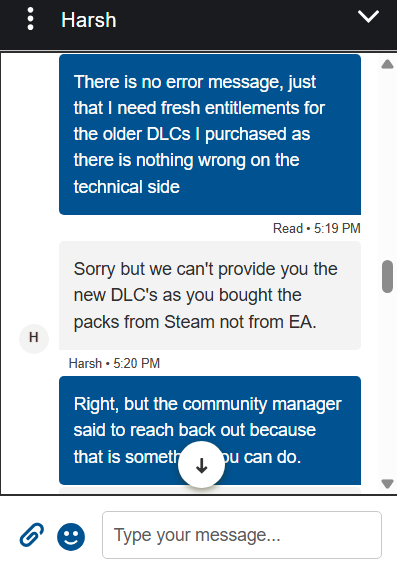
    Hate to see you're having so much trouble accessing your content, that's definitely frustrating! This sounds like your old entitlements for The Sims 4 need to be fully removed from your EA account, and newer versions added instead- while this isn't something we can do for you over the forums, live support would be able to take another look with you to grant new versions of your DLC and allow you to play again. 

    Please try reaching back out to our live support team again through a brand new help case here- make sure you attach this forum conversation when you reach out so the team has additional information to reference on this issue. If you're still not able to access your packs then, please let me know. 

  • EA_Solaire​ No joy, unfortunately :(

    Just contacted the live support team again, and in no uncertain terms, I was told they won't be doing that. They can't give me newer entitlements because apparently "nothing like that exists", despite me forwarding them this forum and providing them evidence that it isn't just a client-side technical issue.