
Forum Widgets

Restore original base game intro video to Sims 1 Legacy Collection?
Right now, I'm entering giveaways for The Sims 1 Legacy Collection, but when I get the code for it, I hope this issue that I'm about to bring up gets resolved. Every time I launched The Sims Deluxe Edition back in 2003, there was this iconic 70-second video intro for the game (https://www.youtube.com/watch?v=cR_E-gw1GmE) that followed both the 2000 EA Games and Maxis logos before segueing into the loading screen. It came with the base game and was kept for Deluxe Edition and most of the expansion packs up until Unleashed, which introduced a horrid rush job of an edit with some footage from the expansion packs cheaply inserted (https://www.youtube.com/watch?v=8LSlFlL9Aig). And for some unknown reason, in SuperStar, Makin' Magic and Complete Collection, EA chose to take the iconic intro out as well as the Maxis logo, and cut directly from the EA Games logo to the loading screen. Somebody on Reddit found a way to re-add the original intro file as well as the original EA Games and Maxis logo files into the the game (https://www.reddit.com/r/thesims1/comments/1droxeg/i_restored_the_sims_1_intro_video_in_the_sims_1/), and it works up to Complete Collection because the files are still compatible. However, according to this comment (https://www.reddit.com/r/thesims1/comments/1d9myu0/comment/maihof0/), this workaround currently does not work with the Legacy Collection because for some odd reason, EA revised the programming to skip the intro video file entirely. Personally, I think that's a very bad move for a release that is meant to be a nostalgic experience to players of The Sims franchise, because once the iconic intro is taken away, everybody is left with the same bland "generic" EA logo from 2005 (https://www.youtube.com/watch?v=qo6UqF2MRAA), which is cut off at the end (just like it was on the Complete Collection) before cutting straight to the loading screen. I know I wasn't expecting a full remaster with the Legacy Collection release nor was I expecting the intro video to be optimized for widescreen, but it does feel a little bit like cheating for the game to not have its nostalgic intro back. Can EA find some way to reinstate the nostalgic 70-second base game video intro into The Sims 1 Legacy Collection? I find that video to be a important throwback to classic Sims gameplay, and it'd be a shame if new players missed out on grooving to such an iconic intro. And I'd like to add a bonus sidenote because the 2005 generic EA logo implementation stuck in the Legacy Collection doesn't quite work in the same way as the EA Games and Maxis logo combinations did from House Party to Unleashed. I never saw the way EA did it for Hot Date back then because Deluxe (which was installed first) superseded it, but there was a sultry transition between the 2000 EA Games and Maxis logos where the EA Games logo faded to a photo of the moon zooming out to a moonlit park at night with two Sims kissing before fading directly into the Maxis logo (https://www.youtube.com/watch?v=-bw8Irpyq-M). I'd think I'd like to see an updated version of that logo combo for the Legacy Collection, in a way that could've fit the game for 2003-2004, but also keeps the Maxis logo so it doesn't diminish their role in the Sims franchise. I think the updated logo combo should start with either the 2003 EA Games "Challenge Everything" logo or the 2006 EA "Sims" logo (which was thankfully kept in The Sims 2 Legacy Collection), but then the flash that makes the EA Games logo disappear instead flashes the screen white and segues to a newly-rendered version of the park setting, with a new Moon, starscape, 3D trees and backlighting on the Sims. As the Sims kiss, a bright solar flare appears from behind the Moon and flashes the screen white; the flash dies down to reveal a subtly animated version of the 2003 3D Maxis logo (likely animated via AI from the image from The Sims 2 base game) (https://youtu.be/u-fkvvq5uFE?si=WB1P_hisRd9ukeVA&t=2), the letters and flare shine. It might be a cool updated logo combo to introduce to The Sims 1 Legacy Collection (and maybe a shorter version of the logo combo, cutting directly from the flash of the EA logo directly to the solar flare flash of the Maxis logo, could be added to The Sims 2 Legacy Collection, with the ending of the Timo Maas remix of The Sims 2 theme (https://youtu.be/LpxnAhHsyMs?si=LNs-PaAu-BK1jSUD&t=317) playing under the Maxis logo).johnchau9518 days agoSeasoned Rookie377Views6likes2Comments
Sims 1 legacy not showing on EA APP.
I have Sims 1 legacy on steam and it is linked with the EA app. I registered the original cd's on Maxis.. can i use those to register on the EA APP Cause i still have all of the original CD with Game Codes? Cause i've got a 4 sims games.. 2 ultimate collection shows up, sims 3 and sims 4 all show up in library.. I have the Sims 1 legacy and sims 2 legacy ( i guess ultimate collection) through steam. Yet sims 1 is the only one that doesnt show up in EA library.RDTravis22 days agoRising Novice58Views1like1Comment
Continued lag and UI scale issues with 1920x1080p
I posted about this same topic 8 MONTHS AGO!! EA have not done anything about this issue and hasn't bothered to reply to my post either. I have been waiting all this time and it's just not good enough, EA. To begin with there was the issue with the UI scale being way too small with the 1920X1080. Since the last update way back in April, this UI issue wasn't fixed and then after that update, it also caused my game to have a terrible jerky lag. It's NOT my laptop that's the issue. Apart from the UI being too small the game ran fine before that update. I actually ended up uninstalling the game way back in April and completely gave up. 2 days ago, I redownloaded and reinstalled the game to see whether EA might have fixed that issue. However, they have not. The issue is still persisting and not one person has bothered to respond and yes, I tried all the so-called new resolution settings you added in the game but that never worked either. It doesn't matter what I do, the game runs like trash. Works perfectly fine on my gaming PC but not on my gaming laptop with 1920X1080. Whatever update you did, it just made everything worse. I've tried all the advice about changing the resolution in Windows settings. It doesn't work! Besides, I shouldn't have to do that every time I want to play the game, and I definitely shouldn't have to buy a new laptop with a better resolution in order for it to work. This is from YOUR update. The game should just run and be playable. I am really quite frustrated with you now, EA. This isn't right. I have waited for a reply from you for 8 months now! I'm trying to be as respectful and patient as possible and you are not making this easy. Has anyone else with 1920x1080, experiencing this problem still or have you seen any improvements at all?? Has EA even replied to you? NOT HAPPY!MeggleMonster27 days agoSeasoned Adventurer54Views0likes1Comment
Sims 1 Wont Launch: Crashes on Opening Screen
Hola! I had very few bugs with Sims 1 until the very last update. Ever since my game won't launch, only a few seconds after the opening screen appears it crashes so I was unable to access the game FOR MONTHS. I didn't pay for a game to have it as decor, I want to play it since my simming experience started with TS2 so I never had the chance to experience TS1. However, I repaired and reinstalled the game dozens of times and it still keeps crashing. I have tried everything and it just won't launch. If anyone has any suggestions, please don't hesitate. Thanks Kind regardsLaFleurDuMal132 months agoSeasoned Novice37Views0likes0Comments
how to completely factory reset the sims 1 legacy collection?
Hello everyone, I recently bought the Sims 1 Legacy Collection so it would be compatible with modern PCs. I made a mistake and wanted to start the game over, but despite uninstalling and reinstalling the game, I still have neighborhoods without houses. I tried the backup files and nothing, I tried deleting the various game folders both where I installed it and in the folders programData/EADescktop/InstallData Where is the game folder located? Either by deleting the Sims link in the Origin folder. I also tried searching in AppData, but I couldn't find any entries for the game or in the Documents. I'm wondering if anyone can help me reinstall the game as if it were new so I can have everything back by default. Thanks to anyone who can help me.Solveddidi83622 months agoNew Novice72Views0likes3Comments
Maxis prepackaged cc
Have any of you managed to successfully download the prepackaged cc that Maxis gave us to this new Legacy edition? I'm talking about the McDonalds kiosk and the Pepsi machine. Anytime I try to open the prepackage files it tells me the game is installed incorrectly. Any work around?Jaletu2 months agoNew Ace191Views0likes4Comments
solution to "unknown error..aborting installation" when installing/reinstalling sims 1
At least this worked for me, with the complete collection, I found it here- https://www.games4theworld.club/t22742-the-sims-1-installation-unknown-error-encountered-aborting-setup# Hello, When you attempt to (re-)install "The Sims 1" from Games4theworld, the installer might not come up at all, or you may be confronted with the error message that is in the topic title of this thread ("unknown error encountered - aborting setup"). The error seems to be caused by a previous (faulty) installation of the game. What you should do now is this. 1. Make sure to unhide all hidden files/folders. In Windows 8 & 10, you should be able to mark the option "hidden items", shown in the screenshot here. In Windows Vista and 7 go to the Control Panel -> Appearance and Personalization -> Show hidden files and folders. Under the tab "View", scroll down a bit and tick the option named "Show hidden files, folders and drives". Click on Apply, then OK. 2. Navigate to the location C:\Program files (x86). You should see a folder named "InstallShield Installation Information". Go inside it. 3. In my case, there was an entry for The Sims 1, with the folder name {F2527115-B8BF-4FDB-B5DA-5AADFB7C13E1}. If you see such a folder in your case, delete it, and try the installation again. Pay close attention to the folder name, so that you don't delete anything wrong ! If you don't have such a folder, you should check all other existing folders instead, under InstallShield Installation Information. Navigate inside each subfolder and open the "Setup.ini" files. Keep looking under "AppName" until you find the folder that contains "The Sims Complete" under AppName. And that is the folder you will need to delete.11KViews2likes3Comments
“map_edit” cheat graphics not displaying (Sims 1 Legacy Collection)
Hi there, I’ve noticed that the graphics that used to be there when using the map_edit cheat in Sims 1 are now missing, and it’s extremely difficult to edit what tiles of the lot have placement permission or not, it would be nice to get this fixed.Blayer982 months agoNew Ace247Views4likes8Comments
SIMS 1 will not stop flashing
Ever since the last update for the 25th birthday set the sims will not load correctly it only flashes, all issues with the sims 2 was fixed but now I am unable to play The Sims. When it does stop flashing for a moment the bottom of the screen is cut off.sexydiva192 months agoSeasoned Newcomer412Views5likes10Comments
Sims and Sims 2 legacy collection
I bought the Sims and Sims 2 legacy collection and I didn't receive the bonus Sims 4 kits on either. The grunge revival or the throwback fitness kits. Amazon will not help me and EA won't help me. It has been a nightmare, Amazon says I have to contact ea the game developer and EA says I have to contact amazon the retailer I bought it from. I have tried to resolve this issue for days. Neither company is taking responsibility. They wont even try for a solution they just tell me to contact the other company there is nothing they can do.cml23083 months agoNew Novice196Views0likes3Comments
Click and censorship visual glitch
Hi, how are you? I recently purchased The Sims Legacy and noticed that when I open the interactions menu in Live Mode (to click on the ground, an object, a Sim, etc.), I get a visual glitch. This also appears in the censorship when my Sim takes a shower or goes to the bathroom. I don't know how to fix it, and while it doesn't prevent me from playing, it's quite annoying. I've attached photos of what I'm dealing with. Thanks in advance for any help!5K1L4H3 months agoNewcomer46Views0likes0Comments
Sims 1 Legacy - Bad UI scaling on 4K/high DPI screen
I have a 3840x2160 (4K) screen. When I launch Sims 1 Legacy Collection (Windows 11, Steam) the UI is oversized and pixelated, as if it were set to 800x600. Only when I manually set Windows to 1920x1080 resolution does the Legacy Collection's updated UI scaling take effect, where text is not pixelated, is much more readable, and the UI takes up less screen space. EA documentation says the release contains "updates for more versatile pixel resolution scaling on large monitors". It seems to only be working for 1920x1080, no larger. [It's scaling for large monitors but has been implemented in a way that is uncomfortable to view.] I am in no way expecting a 25 year old game to be pixel perfect native 4K, but it seems to be a bug that unless the screen resolution is set to exactly 1920x1080, the UI is scaled back up and difficult to view on high DPI screens. For a 2025 release I have freshly paid for, I should not have to manually set and unset my screen resolution in Windows to view it properly. See examples below. Here it doesn't seem like much difference but view them full screen on a 4K monitor to see what I'm talking about. EDIT: To clarify, I’m not talking about the Alt + Enter “scaling” which toggles through windowed view sizes. I’m talking specifically about the size of the UI itself in the game window, viewed in full screen, which greatly varies between 1080p and other resolutions. EDIT 2: The UI size itself isn't necessarily as much of the issue, but more that it's blurry, glitchy and uncomfortable to view and read in 4K. 'Oversized' was a subjective way for me to describe it, but it appeared that way to me on a large monitor due to how pixelated it looked in comparison to the smaller UI in 1080p (which has its own issues as described here, here and elsewhere). Windows natively to 3840x2160 scale Bad - oversized UI, blurry text, pixelated object sprites Windows manually set to 1920x1080 Good - UI as optimised for new release, legible text, better pixel scaling for sprites. But I had to manually set this before launching the gamejnhmthw3 months agoSeasoned Rookie4.2KViews1like32Comments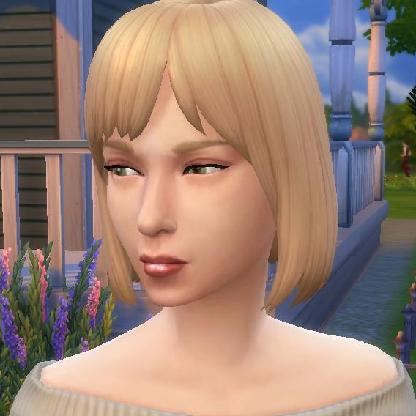
Wish List Item: Please give us a choice with add-on packs!
The Legacy Edition came with the edition of certain "Packs" that were never a part of any of my disk games. Never. You could download the characters from the commercials, if you chose. I chose not to. I've never heard of this massive group of mutant/army/futuristic skins that fill my skin data folder. I would rather not a) have NPC Sims randomly spawn looking like that in any of my places (Downtown, Magic Town, Studio Town) nor b) have to scroll through endless amounts of non-desirable faces and outfits that are better suited to a war game than the Sims. Choice is a wonderful thing. It's much of the appeal of The Sims: You tell your story your way, you choose how to play, you even choose which custom content to include. Frankly, having these packs automatically included limits my choice. I pull them out of the folder and then the program "nags" me about needing file repairs. Not being able to trust that my files have not become corrupted, I need to periodically "repair" them, which means the EA app will reinstall them. It's time consuming, bothersome, and limits my enjoyment of the game. Please, please, please, EA, consider making this a choice - a tick box even, for installing the game. Sincerely, A long time fan since 2000LillyPutian4 months agoNew Scout147Views1like2Comments
Unable to perform any social interactions between household sims
In the Sims 1 i played normally for a few in game days but suddenly I am no longer able to have the two sims interact with each other at all. controlling one and clicking on the other just brings up the message that there are no interactions available. i have tried restarting the game to no luck.Cheyanniemae4 months agoSeasoned Newcomer361Views3likes6Comments
Z-Sprites clipping through walls (in cases they don't in Complete Collection)
While some Maxis/EA objects do clip in Complete Collection (the Livin' Large doors come to mind) many objects which do not clip in Complete Collection do clip in Legacy edition. "The Elegant Chef Buffet Table" from house party is a pretty bad offender. As do the backs of "The Oval Glass Wall Sconce". In fact, quite a few wall lamps have backs that clip when the front of the lamp is facing North West.Leo_Gruen4 months agoRising Traveler114Views1like1Comment
The Sims Legacy Collection launching problem
I usually get when trying to launch the Sims + packs a message saying that the ea app cannot launch the Sims + packs. I have all the other Sims games through ea app (that I own and no problem till now). I only bought the Sims Legacy Collection because I have the Sims 2 Ultimate.metmichallica4 months agoRising Traveler239Views0likes4CommentsCommunity lots not loading in Sims 1 Legacy edition.
I bought the legacy edition off of EA but none of the community or DLC lots have anything in them. I can load into them just fine, but there aren't any houses/ buildings and there aren't any sims. I've tried uninstalling the game multiple times and even "repairing" the game. I've even tried to moves some of the files around but haven't had any luck at all. Any help is greatly appreciated!!askammy5 months agoRising Newcomer168Views0likes2Comments


Community Highlights
Featured Places
The Sims
Get simspired with our Sims community; share creations, discuss stories, get support and get updated on all Sims titles.The Sims 4
Share your Sims 4 creations, discuss stories, get help with expansions & updates, or help others in our friendly forum.The Sims 3
Talk about your Sims 3 creations, chat about what happened in your game and get help from the Sims community.The Sims 2
Share your experiences, get to know other Simmers, and find troubleshooting & fixes in the official The Sims 2 community.The Sims
Share your experiences with the community, get to know other Simmers, and find troubleshooting & fixes for the original The Sims game.MySims Cozy Bundle
Play the original MySims and MySims Kingdoms with the new MySims Cozy Bundle for Nintendo Switch and PC!The Sims Mobile
Make a connection with Simmers, share your knowledge, and troubleshoot issues in The Sims Mobile official community.The Sims FreePlay
Join Simmers like you, discuss your time with the game, and find fixes in The Sims FreePlay official community.The Sims Franchise Discussion
Discuss The Sims Medieval, classic The Sims titles, and speculate on the future of the franchise, including Project Rene.The Sims Game Info Hub
Sims highlights, news, patch notes, livestream, with curation guides and posts from Maxis.


