EA_Kent Community Manager
Community ManagerCommunity ManagerCommunity ManagerGot it, thanks!
Can we try running through some troubleshooting steps to see if it helps with the issues you've been seeing? A good place to start off would be with the basic connectivity troubleshooting steps over at the EA Help website.
If you're still having trouble after that check out the PC-specific steps as well. Let me know how that goes when you have the chance. Thanks!
/Kent
Community ManagerThanks for giving it a shot.
It is strange that it only seems to happen periodically. Does it seem like there's any pattern to it at all? Are you in a particular part of the map, for instance?
/Kent
Community ManagerAh, I see what you mean.
When you've got the chance could you try running a UO Trace? That would give us a detailed look at the connection between your PC and the servers, so if there's something happening along the way we may be able to spot it.
You can find more details on how to run the test over at the EA Help website. Once you have the results please send them to me in a direct message. Thank you!
/Kent
@EA_Kent I attached it in the initial post
Community ManagerGot it, thanks!
When you have a chance could you try running it once more, but let it go until it's sent at least 100 packets? That way we have a decent sample for the results. Feel free to send me the results once you've had a chance to give it a shot.
Thanks again.
/Kent
@EA_Kent Here is a new trace with more packets.
Community ManagerThanks! I appreciate it.
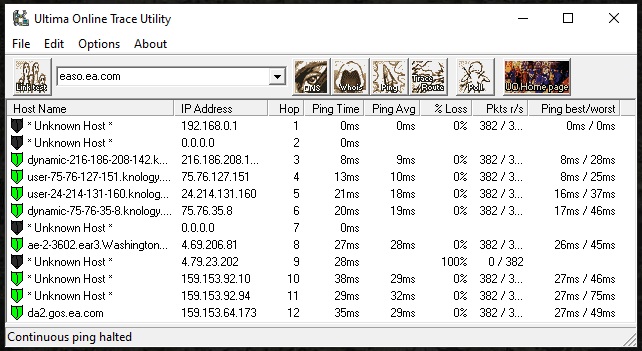
The trace looks pretty good. There doesn't appear to be any measurable packet loss, and the ping stays consistently low throughout.
When you've got a chance would you mind trying something else for me? I'm curious what would happen if you start up your PC in a Clean Boot before you launch Apex Legends. If there is something else running on the PC that could be causing this to happen that may help to get around it.
For more information on how to set one up check out the EA Help website. Let me know how that goes when you've had the chance to give it a shot. Thanks again.
/Kent
Community ManagerAh, I see. Thanks for letting me know.
Which datacenter are you normally connecting to? Have you tried switching to a different one to test and see if that makes any difference at all?
/Kent
Community ManagerGotcha, thanks!
Have you had a chance to try using a different DNS in Windows to see if that helps? I've seen some cases in the past where changing the DNS can help get around issues like this.
You can change the DNS in Windows through the TCP/IP Settings. For more details on how to get there check out the Microsoft Support website. If you choose Manual you can then enter the DNS you would like to use. I typically suggest using the public Google DNS (primary: 8.8.8.8, secondary: 8.8.4.4), but if there's a different, open DNS you would rather use that's OK as well.
Let me know how that goes when you have the chance to try it. Thanks again.
/Kent
Community ManagerAh, gotcha.
What happens if you start up your PC in a Clean Boot before launching Apex Legends? If there's something else running on your PC that might be related the packet loss a Clean Boot may help to get around it.
For more details on how to set one up check out the EA Help website. Let me know how that goes when you have a chance to try it.
/Kent
Is there just no visibility into the one server showing complete packet loss in the traceroute?
@EA_Kent It does seem like based on another thread, https://answers.ea.com/t5/Technical-Issues/Apex-Latency-and-Packet-Loss-issues/td-p/7976473/page/3, that the time frame of about a month ago others suddenly began to experience a similar issue to myself.
Community ManagerUsually when it shows 100% packet loss it just didn't actually report any results rather than every packet being dropped at that particular hop.
It is interesting that your issues seem to have started happening around the same time. Does it seem like your performance in-game is actually affected by this? Are you running into problems with lag or rubber banding while the packet loss icon is coming up? If not, I'm wondering if it's a false positive of some kind.
/Kent
Community ManagerGotcha. I'll pass along this information for a look.
Are you usually playing Apex Legends around the same time every day?
/Kent
Community ManagerThanks for the updates!
If it's happening around the same time each day I'm wondering if it could be a local issue of some kind. Have you tried reaching out to your ISP to see if they're seeing any problems in the area around that time of day?
/Kent
 Community Manager